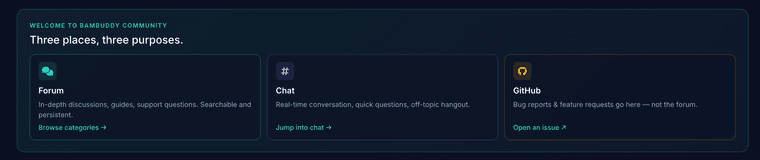

As the main page of the forum says: feature request have to go into a Github issue.
Global Moderators
Private
Forum wide moderators
Posts
-
Feature Request: AMS Drying Notifications and Configurable Printer Light Auto-Off -
Detailed Spool History Log: Track Spool Location & Automatic/Manual Weight ChangesPlease open a feature request on Github https://github.com/maziggy/bambuddy/issues.
-
Bambuddy Appliance: clearer pricing, and an apologyHi everyone,
When the Bambuddy Appliance launched, the website and the announcement called it an "annual subscription". That wording was confusing, and many of you read it as "pay every year or your box stops working". That was never how it worked, but explaining it badly is on me, not on you. I'm sorry for the confusion and the frustration it caused.
Your feedback also made me rethink the model itself. So from today, the appliance is sold differently.
The new pricing
Price What you get Personal €79 once ($89 + sales tax) 12 months of appliance updates and support. Non-commercial use. Lifetime €199 once ($219 + sales tax) Every appliance update for as long as the appliance is developed, plus 12 months of support. Non-commercial use. Business €249 per year ($279 + sales tax) Commercial use. Updates and support while subscribed, a direct email line, requests handled first, a response time in writing. Personal and Lifetime include VAT; Business is plus VAT.
What "after the first year" means
- You buy it once and it's yours. The appliance keeps working exactly as it is, indefinitely. Nothing is switched off or locked.
- After the first year of Personal, Bambuddy itself still updates from the admin panel, and Debian security updates keep coming. What stops is updates to the appliance layer (admin panel, setup wizard, update tooling) and support.
- Want every appliance update for good? That's Lifetime. A Personal appliance can be upgraded later, just write to support@bambuddy.cool.
What doesn't change
- Bambuddy stays free and open source (AGPL). The appliance runs the very same Bambuddy, with no features behind a paywall.
- If you'd rather set it up yourself, the Docker install costs nothing and always will.
- Support: Personal and Lifetime through GitHub issues, Business by email. Questions about your key, an order or a refund go to support@bambuddy.cool, whatever you bought.
Already bought one?
If you bought the appliance under the old annual wording, you've been moved to Lifetime at no extra cost, and your subscription won't renew.
All details: https://get.bambuddy.cool/#pricing
Thank you for the honest feedback. It stung a bit, and it made this better.
Martin
-
H2D: OrcaSlicer nightly files fail with "Filament Track Switch offline"H2D: OrcaSlicer nightly files fail with "Filament Track Switch offline"
If your H2D has no Filament Track Switch and you slice with the OrcaSlicer 2.5.0 nightly, prints fail about 2 minutes in with:
0700-7400 The Filament Track Switch is offline.
0700-8029 This print requires a Filament Track Switch, but it is currently offline.This happens whether you print from Bambuddy or straight from OrcaSlicer. The nightly tells the printer to load the filament into the opposite nozzle, which only the switch could do. We confirmed it on our own H2D: the same plate sliced in Bambu Studio prints fine with the same AMS slot.
Workaround: slice H2D jobs with Bambu Studio or a stable OrcaSlicer release until the fix is merged. If a print already failed, cancel it on the printer and re-slice.
Bambuddy issue: https://github.com/maziggy/bambuddy/issues/3220
OrcaSlicer issue and fix: https://github.com/OrcaSlicer/OrcaSlicer/issues/15927 / https://github.com/OrcaSlicer/OrcaSlicer/pull/15929 -
General connection issues only with P1SNeed to look into it more detailed. Please open an Github issue and attach a support-package.
-
HTTPS for Homeassistant SmartSwitch connectionNeed to look into it more detailed. Please open a feature request.
-
Looking for Testers Looking for help
 Anyone using Shopify to sell printed parts? Please drop me a DM. Thanks!
-
The future of BambuddyWhat do you actually want from Bambuddy?
Honest admission: I don't get much time to use Bambuddy myself these days - nearly all my printing time goes into building it. So my sense of what's missing comes from issues, from this server, and from guessing. I'd rather hear it from you.
Two questions. Answer either, or both.
1. The top three things you'd want next.
Not a full wishlist - the three that would change your day. A missing feature, a workflow that's rough, something you keep doing by hand, a tab you keep switching to. Concrete beats abstract: "I want X so I can stop doing Y" tells me far more than "better queue management". If it's already a GitHub issue, drop the number - votes there count: https://github.com/maziggy/bambuddy/issues2. Where do you see Bambuddy in a year?
Is it the thing you leave open on a second screen? The thing that runs the farm while you're not looking? A spool database with printers attached? Something that should stay small and do less? I'm curious where you think this is heading, including if that's somewhere I'm not steering it.No promises attached to this thread - I'm collecting signal, not publishing a roadmap. But what keeps coming up here is usually what ends up getting built.
-
option to add sealed spools