
Hi, so I want to use the makerworld integration but I don't want to sync every preset in Bambu Studio. It makes it really hard to setup prints when I have to go through a few thousand profiles just to find H2D PETG Generic. Is there not a way to remove cloud profiles?
World
Topics from outside of this forum. Views and opinions represented here may not reflect those of this forum and its members.
A world of content at your fingertips…
Think of this as your global discovery feed. It brings together interesting discussions from across the web and other communities, all in one place.
While you can browse what's trending now, the best way to use this feed is to make it your own. By creating an account, you can follow specific creators and topics to filter out the noise and see only what matters to you.
Ready to dive in? Create an account to start following others, get notified when people reply to you, and save your favorite finds.
Register Login-
The printer frequently stops if it can find the build plate marker. It gives the option to ignore the error and continue. I can't seem to find a way to choose that option from the bambuddy interface - so I have to go the the printer and use the touchscreen.
Is there a way to do this? What am I missing?
-

Bambuddy: Finally, the Self-Hosted Tool That Replaces Bambu's Cloud - sparx-worx
What I found instead was Bambuddy, and it turned out to solve both of those problems while also being built around something bigger: getting Bambu Lab

sparx-worx (sparx-worx.com)
-
I used the windows native install. Everything seems to be working except a couple of things that I have no idea how to fix. I have read all the information but it is way over my head as to try to trouble shoot.
I can not get the live camera from each machine to show up even though they are connected and I also can not get a virtual printer built. I get stuck at binding because there is no choices in the drop down box. Can someone please helpI also have noticed that each time I print directly at the machine from the sd card it shows up in the archive with no name
-
Hi all! I've been really enjoying this project. As a
masochistk8s homelabber, I wanted bambuddy running in my standard stack. To enable this I created a Helm chart for bambuddy, you can find it here: https://github.com/npelikan/bambuddy-helm. Please feel free to use it. Question, for @martinnyhc-1 primarily -- I'm happy to keep maintaining this as my own project, but how would you prefer to distribute this out to the wider community? Fold it into the core bambuddy repo? Link out in documentation as a community project? Happy to submit PRs for either
-
Basically I have bambuddy setup, and when I click on "archives" it shows nothing and the docker instance log prints out like 10 pages of python errors, and nothing shows up in the actual bambuddy logs.. because I assume the python error is preempting it.
There's no FTP issue, the archives are getting created and transferred to the directory. The error occurs when I try to view Archives in the web-app, and it appears to be something wrong with the API call not getting what it expects. I don't know enough about the code to understand the error.
I am using version 2.4.6 on maziggy/bambuddy docker instance on a raspberry pi 5 with docker setup.
I'm hoping this is something simple/weird with my setup and not an actual bug.
Here is the error in the docker logs:
INFO:     172.16.6.29:49362 - "POST /api/v1/cloud/filament-info HTTP/1.1" 200 OK

ERROR:    Exception in ASGI application

  + Exception Group Traceback (most recent call last):

  |   File "/usr/local/lib/python3.13/site-packages/starlette/_utils.py", line 81, in collapse_excgroups

  |     yield

  |   File "/usr/local/lib/python3.13/site-packages/starlette/middleware/base.py", line 192, in __call__

  |     async with anyio.create_task_group() as task_group:

  |                ~~~~~~~~~~~~~~~~~~~~~~~^^

  |   File "/usr/local/lib/python3.13/site-packages/anyio/_backends/_asyncio.py", line 799, in __aexit__

  |     raise BaseExceptionGroup(

  |         "unhandled errors in a TaskGroup", self._exceptions

  |     ) from None

  | ExceptionGroup: unhandled errors in a TaskGroup (1 sub-exception)

  +-+---------------- 1 ----------------

    | Traceback (most recent call last):

    |   File "/usr/local/lib/python3.13/site-packages/uvicorn/protocols/http/httptools_impl.py", line 421, in run_asgi

    |     result = await app(  # type: ignore[func-returns-value]

    |              ^^^^^^^^^^^^^^^^^^^^^^^^^^^^^^^^^^^^^^^^^^^^^^

    |         self.scope, self.receive, self.send

    |         ^^^^^^^^^^^^^^^^^^^^^^^^^^^^^^^^^^^

    |     )

    |     ^

    |   File "/usr/local/lib/python3.13/site-packages/uvicorn/middleware/proxy_headers.py", line 62, in __call__

    |     return await self.app(scope, receive, send)

    |            ^^^^^^^^^^^^^^^^^^^^^^^^^^^^^^^^^^^^

    |   File "/usr/local/lib/python3.13/site-packages/fastapi/applications.py", line 1159, in __call__

    |     await super().__call__(scope, receive, send)

    |   File "/usr/local/lib/python3.13/site-packages/starlette/applications.py", line 90, in __call__

    |     await self.middleware_stack(scope, receive, send)

    |   File "/usr/local/lib/python3.13/site-packages/starlette/middleware/errors.py", line 186, in __call__

    |     raise exc

    |   File "/usr/local/lib/python3.13/site-packages/starlette/middleware/errors.py", line 164, in __call__

    |     await self.app(scope, receive, _send)

    |   File "/usr/local/lib/python3.13/site-packages/starlette/middleware/base.py", line 191, in __call__

    |     with recv_stream, send_stream, collapse_excgroups():

    |                                    ~~~~~~~~~~~~~~~~~~^^

    |   File "/usr/local/lib/python3.13/contextlib.py", line 162, in __exit__

    |     self.gen.throw(value)

    |     ~~~~~~~~~~~~~~^^^^^^^

    |   File "/usr/local/lib/python3.13/site-packages/starlette/_utils.py", line 87, in collapse_excgroups

    |     raise exc

    |   File "/usr/local/lib/python3.13/site-packages/starlette/middleware/base.py", line 193, in __call__

    |     response = await self.dispatch_func(request, call_next)

    |                ^^^^^^^^^^^^^^^^^^^^^^^^^^^^^^^^^^^^^^^^^^^^

    |   File "/app/backend/app/main.py", line 6031, in trace_id_middleware

    |     response = await call_next(request)

    |                ^^^^^^^^^^^^^^^^^^^^^^^^

    |   File "/usr/local/lib/python3.13/site-packages/starlette/middleware/base.py", line 168, in call_next

    |     raise app_exc from app_exc.__cause__ or app_exc.__context__

    |   File "/usr/local/lib/python3.13/site-packages/starlette/middleware/base.py", line 144, in coro

    |     await self.app(scope, receive_or_disconnect, send_no_error)

    |   File "/usr/local/lib/python3.13/site-packages/starlette/middleware/base.py", line 191, in __call__

    |     with recv_stream, send_stream, collapse_excgroups():

    |                                    ~~~~~~~~~~~~~~~~~~^^

    |   File "/usr/local/lib/python3.13/contextlib.py", line 162, in __exit__

    |     self.gen.throw(value)

    |     ~~~~~~~~~~~~~~^^^^^^^

    |   File "/usr/local/lib/python3.13/site-packages/starlette/_utils.py", line 87, in collapse_excgroups

    |     raise exc

    |   File "/usr/local/lib/python3.13/site-packages/starlette/middleware/base.py", line 193, in __call__

    |     response = await self.dispatch_func(request, call_next)

    |                ^^^^^^^^^^^^^^^^^^^^^^^^^^^^^^^^^^^^^^^^^^^^

    |   File "/app/backend/app/main.py", line 5992, in auth_middleware

    |     return await call_next(request)

    |            ^^^^^^^^^^^^^^^^^^^^^^^^

    |   File "/usr/local/lib/python3.13/site-packages/starlette/middleware/base.py", line 168, in call_next

    |     raise app_exc from app_exc.__cause__ or app_exc.__context__

    |   File "/usr/local/lib/python3.13/site-packages/starlette/middleware/base.py", line 144, in coro

    |     await self.app(scope, receive_or_disconnect, send_no_error)

    |   File "/usr/local/lib/python3.13/site-packages/starlette/middleware/base.py", line 191, in __call__

    |     with recv_stream, send_stream, collapse_excgroups():

    |                                    ~~~~~~~~~~~~~~~~~~^^

    |   File "/usr/local/lib/python3.13/contextlib.py", line 162, in __exit__

    |     self.gen.throw(value)

    |     ~~~~~~~~~~~~~~^^^^^^^

    |   File "/usr/local/lib/python3.13/site-packages/starlette/_utils.py", line 87, in collapse_excgroups

    |     raise exc

    |   File "/usr/local/lib/python3.13/site-packages/starlette/middleware/base.py", line 193, in __call__

    |     response = await self.dispatch_func(request, call_next)

    |                ^^^^^^^^^^^^^^^^^^^^^^^^^^^^^^^^^^^^^^^^^^^^

    |   File "/app/backend/app/main.py", line 5800, in security_headers_middleware

    |     response = await call_next(request)

    |                ^^^^^^^^^^^^^^^^^^^^^^^^

    |   File "/usr/local/lib/python3.13/site-packages/starlette/middleware/base.py", line 168, in call_next

    |     raise app_exc from app_exc.__cause__ or app_exc.__context__

    |   File "/usr/local/lib/python3.13/site-packages/starlette/middleware/base.py", line 144, in coro

    |     await self.app(scope, receive_or_disconnect, send_no_error)

    |   File "/usr/local/lib/python3.13/site-packages/starlette/middleware/exceptions.py", line 63, in __call__

    |     await wrap_app_handling_exceptions(self.app, conn)(scope, receive, send)

    |   File "/usr/local/lib/python3.13/site-packages/starlette/_exception_handler.py", line 53, in wrapped_app

    |     raise exc

    |   File "/usr/local/lib/python3.13/site-packages/starlette/_exception_handler.py", line 42, in wrapped_app

    |     await app(scope, receive, sender)

    |   File "/usr/local/lib/python3.13/site-packages/fastapi/middleware/asyncexitstack.py", line 18, in __call__

    |     await self.app(scope, receive, send)

    |   File "/usr/local/lib/python3.13/site-packages/starlette/routing.py", line 660, in __call__

    |     await self.middleware_stack(scope, receive, send)

    |   File "/usr/local/lib/python3.13/site-packages/starlette/routing.py", line 680, in app

    |     await route.handle(scope, receive, send)

    |   File "/usr/local/lib/python3.13/site-packages/starlette/routing.py", line 276, in handle

    |     await self.app(scope, receive, send)

    |   File "/usr/local/lib/python3.13/site-packages/fastapi/routing.py", line 134, in app

    |     await wrap_app_handling_exceptions(app, request)(scope, receive, send)

    |   File "/usr/local/lib/python3.13/site-packages/starlette/_exception_handler.py", line 53, in wrapped_app

    |     raise exc

    |   File "/usr/local/lib/python3.13/site-packages/starlette/_exception_handler.py", line 42, in wrapped_app

    |     await app(scope, receive, sender)

    |   File "/usr/local/lib/python3.13/site-packages/fastapi/routing.py", line 120, in app

    |     response = await f(request)

    |                ^^^^^^^^^^^^^^^^

    |   File "/usr/local/lib/python3.13/site-packages/fastapi/routing.py", line 695, in app

    |     content = await serialize_response(

    |               ^^^^^^^^^^^^^^^^^^^^^^^^^

    |     ...<11 lines>...

    |     )

    |     ^

    |   File "/usr/local/lib/python3.13/site-packages/fastapi/routing.py", line 300, in serialize_response

    |     raise ResponseValidationError(

    |     ...<3 lines>...

    |     )

    | fastapi.exceptions.ResponseValidationError: 3 validation errors:

    |   {'type': 'datetime_type', 'loc': ('response', 0, 'created_at'), 'msg': 'Input should be a valid datetime', 'input': None}

    |   {'type': 'datetime_type', 'loc': ('response', 1, 'created_at'), 'msg': 'Input should be a valid datetime', 'input': None}

    |   {'type': 'datetime_type', 'loc': ('response', 2, 'created_at'), 'msg': 'Input should be a valid datetime', 'input': None}

    |

    |   File "/app/backend/app/api/routes/archives.py", line 309, in list_archives

    |     GET /api/v1/archives/

    +------------------------------------

The above exception was the direct cause of the following exception:

Traceback (most recent call last):

  File "/usr/local/lib/python3.13/site-packages/uvicorn/protocols/http/httptools_impl.py", line 421, in run_asgi

    result = await app(  # type: ignore[func-returns-value]

             ^^^^^^^^^^^^^^^^^^^^^^^^^^^^^^^^^^^^^^^^^^^^^^

        self.scope, self.receive, self.send

        ^^^^^^^^^^^^^^^^^^^^^^^^^^^^^^^^^^^

    )

    ^

  File "/usr/local/lib/python3.13/site-packages/uvicorn/middleware/proxy_headers.py", line 62, in __call__

    return await self.app(scope, receive, send)

           ^^^^^^^^^^^^^^^^^^^^^^^^^^^^^^^^^^^^

  File "/usr/local/lib/python3.13/site-packages/fastapi/applications.py", line 1159, in __call__

    await super().__call__(scope, receive, send)

  File "/usr/local/lib/python3.13/site-packages/starlette/applications.py", line 90, in __call__

    await self.middleware_stack(scope, receive, send)

  File "/usr/local/lib/python3.13/site-packages/starlette/middleware/errors.py", line 186, in __call__

    raise exc

  File "/usr/local/lib/python3.13/site-packages/starlette/middleware/errors.py", line 164, in __call__

    await self.app(scope, receive, _send)

  File "/usr/local/lib/python3.13/site-packages/starlette/middleware/base.py", line 191, in __call__

    with recv_stream, send_stream, collapse_excgroups():

                                   ~~~~~~~~~~~~~~~~~~^^

  File "/usr/local/lib/python3.13/contextlib.py", line 162, in __exit__

    self.gen.throw(value)

    ~~~~~~~~~~~~~~^^^^^^^

  File "/usr/local/lib/python3.13/site-packages/starlette/_utils.py", line 87, in collapse_excgroups

    raise exc

  File "/usr/local/lib/python3.13/site-packages/starlette/middleware/base.py", line 193, in __call__

    response = await self.dispatch_func(request, call_next)

               ^^^^^^^^^^^^^^^^^^^^^^^^^^^^^^^^^^^^^^^^^^^^

  File "/app/backend/app/main.py", line 6031, in trace_id_middleware

    response = await call_next(request)

               ^^^^^^^^^^^^^^^^^^^^^^^^

  File "/usr/local/lib/python3.13/site-packages/starlette/middleware/base.py", line 168, in call_next

    raise app_exc from app_exc.__cause__ or app_exc.__context__

  File "/usr/local/lib/python3.13/site-packages/starlette/middleware/base.py", line 144, in coro

    await self.app(scope, receive_or_disconnect, send_no_error)

  File "/usr/local/lib/python3.13/site-packages/starlette/middleware/base.py", line 191, in __call__

    with recv_stream, send_stream, collapse_excgroups():

                                   ~~~~~~~~~~~~~~~~~~^^

  File "/usr/local/lib/python3.13/contextlib.py", line 162, in __exit__

    self.gen.throw(value)

    ~~~~~~~~~~~~~~^^^^^^^

  File "/usr/local/lib/python3.13/site-packages/starlette/_utils.py", line 87, in collapse_excgroups

    raise exc

  File "/usr/local/lib/python3.13/site-packages/starlette/middleware/base.py", line 193, in __call__

    response = await self.dispatch_func(request, call_next)

               ^^^^^^^^^^^^^^^^^^^^^^^^^^^^^^^^^^^^^^^^^^^^

  File "/app/backend/app/main.py", line 5992, in auth_middleware

    return await call_next(request)

           ^^^^^^^^^^^^^^^^^^^^^^^^

  File "/usr/local/lib/python3.13/site-packages/starlette/middleware/base.py", line 168, in call_next

    raise app_exc from app_exc.__cause__ or app_exc.__context__

  File "/usr/local/lib/python3.13/site-packages/starlette/middleware/base.py", line 144, in coro

    await self.app(scope, receive_or_disconnect, send_no_error)

  File "/usr/local/lib/python3.13/site-packages/starlette/middleware/base.py", line 191, in __call__

    with recv_stream, send_stream, collapse_excgroups():

                                   ~~~~~~~~~~~~~~~~~~^^

  File "/usr/local/lib/python3.13/contextlib.py", line 162, in __exit__

    self.gen.throw(value)

    ~~~~~~~~~~~~~~^^^^^^^

  File "/usr/local/lib/python3.13/site-packages/starlette/_utils.py", line 87, in collapse_excgroups

    raise exc

  File "/usr/local/lib/python3.13/site-packages/starlette/middleware/base.py", line 193, in __call__

    response = await self.dispatch_func(request, call_next)

               ^^^^^^^^^^^^^^^^^^^^^^^^^^^^^^^^^^^^^^^^^^^^

  File "/app/backend/app/main.py", line 5800, in security_headers_middleware

    response = await call_next(request)

               ^^^^^^^^^^^^^^^^^^^^^^^^

  File "/usr/local/lib/python3.13/site-packages/starlette/middleware/base.py", line 168, in call_next

    raise app_exc from app_exc.__cause__ or app_exc.__context__

  File "/usr/local/lib/python3.13/site-packages/starlette/middleware/base.py", line 144, in coro

    await self.app(scope, receive_or_disconnect, send_no_error)

  File "/usr/local/lib/python3.13/site-packages/starlette/middleware/exceptions.py", line 63, in __call__

    await wrap_app_handling_exceptions(self.app, conn)(scope, receive, send)

  File "/usr/local/lib/python3.13/site-packages/starlette/_exception_handler.py", line 53, in wrapped_app

    raise exc

  File "/usr/local/lib/python3.13/site-packages/starlette/_exception_handler.py", line 42, in wrapped_app

    await app(scope, receive, sender)

  File "/usr/local/lib/python3.13/site-packages/fastapi/middleware/asyncexitstack.py", line 18, in __call__

    await self.app(scope, receive, send)

  File "/usr/local/lib/python3.13/site-packages/starlette/routing.py", line 660, in __call__

    await self.middleware_stack(scope, receive, send)

  File "/usr/local/lib/python3.13/site-packages/starlette/routing.py", line 680, in app

    await route.handle(scope, receive, send)

  File "/usr/local/lib/python3.13/site-packages/starlette/routing.py", line 276, in handle

    await self.app(scope, receive, send)

  File "/usr/local/lib/python3.13/site-packages/fastapi/routing.py", line 134, in app

    await wrap_app_handling_exceptions(app, request)(scope, receive, send)

  File "/usr/local/lib/python3.13/site-packages/starlette/_exception_handler.py", line 53, in wrapped_app

    raise exc

  File "/usr/local/lib/python3.13/site-packages/starlette/_exception_handler.py", line 42, in wrapped_app

    await app(scope, receive, sender)

  File "/usr/local/lib/python3.13/site-packages/fastapi/routing.py", line 120, in app

    response = await f(request)

               ^^^^^^^^^^^^^^^^

  File "/usr/local/lib/python3.13/site-packages/fastapi/routing.py", line 695, in app

    content = await serialize_response(

              ^^^^^^^^^^^^^^^^^^^^^^^^^

    ...<11 lines>...

    )

    ^

  File "/usr/local/lib/python3.13/site-packages/fastapi/routing.py", line 300, in serialize_response

    raise ResponseValidationError(

    ...<3 lines>...

    )

fastapi.exceptions.ResponseValidationError: 3 validation errors:

  {'type': 'datetime_type', 'loc': ('response', 0, 'created_at'), 'msg': 'Input should be a valid datetime', 'input': None}

  {'type': 'datetime_type', 'loc': ('response', 1, 'created_at'), 'msg': 'Input should be a valid datetime', 'input': None}

  {'type': 'datetime_type', 'loc': ('response', 2, 'created_at'), 'msg': 'Input should be a valid datetime', 'input': None}

  File "/app/backend/app/api/routes/archives.py", line 309, in list_archives

    GET /api/v1/archives/

ERROR:    Exception in ASGI application

  + Exception Group Traceback (most recent call last):

  |   File "/usr/local/lib/python3.13/site-packages/starlette/_utils.py", line 81, in collapse_excgroups

  |     yield

  |   File "/usr/local/lib/python3.13/site-packages/starlette/middleware/base.py", line 192, in __call__

  |     async with anyio.create_task_group() as task_group:

  |                ~~~~~~~~~~~~~~~~~~~~~~~^^

  |   File "/usr/local/lib/python3.13/site-packages/anyio/_backends/_asyncio.py", line 799, in __aexit__

  |     raise BaseExceptionGroup(

  |         "unhandled errors in a TaskGroup", self._exceptions

  |     ) from None

  | ExceptionGroup: unhandled errors in a TaskGroup (1 sub-exception)

  +-+---------------- 1 ----------------

    | Traceback (most recent call last):

    |   File "/usr/local/lib/python3.13/site-packages/uvicorn/protocols/http/httptools_impl.py", line 421, in run_asgi

    |     result = await app(  # type: ignore[func-returns-value]

    |              ^^^^^^^^^^^^^^^^^^^^^^^^^^^^^^^^^^^^^^^^^^^^^^

    |         self.scope, self.receive, self.send

    |         ^^^^^^^^^^^^^^^^^^^^^^^^^^^^^^^^^^^

    |     )

    |     ^

    |   File "/usr/local/lib/python3.13/site-packages/uvicorn/middleware/proxy_headers.py", line 62, in __call__

    |     return await self.app(scope, receive, send)

    |            ^^^^^^^^^^^^^^^^^^^^^^^^^^^^^^^^^^^^

    |   File "/usr/local/lib/python3.13/site-packages/fastapi/applications.py", line 1159, in __call__

    |     await super().__call__(scope, receive, send)

    |   File "/usr/local/lib/python3.13/site-packages/starlette/applications.py", line 90, in __call__

    |     await self.middleware_stack(scope, receive, send)

    |   File "/usr/local/lib/python3.13/site-packages/starlette/middleware/errors.py", line 186, in __call__

    |     raise exc

    |   File "/usr/local/lib/python3.13/site-packages/starlette/middleware/errors.py", line 164, in __call__

    |     await self.app(scope, receive, _send)

    |   File "/usr/local/lib/python3.13/site-packages/starlette/middleware/base.py", line 191, in __call__

    |     with recv_stream, send_stream, collapse_excgroups():

    |                                    ~~~~~~~~~~~~~~~~~~^^

    |   File "/usr/local/lib/python3.13/contextlib.py", line 162, in __exit__

    |     self.gen.throw(value)

    |     ~~~~~~~~~~~~~~^^^^^^^

    |   File "/usr/local/lib/python3.13/site-packages/starlette/_utils.py", line 87, in collapse_excgroups

    |     raise exc

    |   File "/usr/local/lib/python3.13/site-packages/starlette/middleware/base.py", line 193, in __call__

    |     response = await self.dispatch_func(request, call_next)

    |                ^^^^^^^^^^^^^^^^^^^^^^^^^^^^^^^^^^^^^^^^^^^^

    |   File "/app/backend/app/main.py", line 6031, in trace_id_middleware

    |     response = await call_next(request)

    |                ^^^^^^^^^^^^^^^^^^^^^^^^

    |   File "/usr/local/lib/python3.13/site-packages/starlette/middleware/base.py", line 168, in call_next

    |     raise app_exc from app_exc.__cause__ or app_exc.__context__

    |   File "/usr/local/lib/python3.13/site-packages/starlette/middleware/base.py", line 144, in coro

    |     await self.app(scope, receive_or_disconnect, send_no_error)

    |   File "/usr/local/lib/python3.13/site-packages/starlette/middleware/base.py", line 191, in __call__

    |     with recv_stream, send_stream, collapse_excgroups():

    |                                    ~~~~~~~~~~~~~~~~~~^^

    |   File "/usr/local/lib/python3.13/contextlib.py", line 162, in __exit__

    |     self.gen.throw(value)

    |     ~~~~~~~~~~~~~~^^^^^^^

    |   File "/usr/local/lib/python3.13/site-packages/starlette/_utils.py", line 87, in collapse_excgroups

    |     raise exc

    |   File "/usr/local/lib/python3.13/site-packages/starlette/middleware/base.py", line 193, in __call__

    |     response = await self.dispatch_func(request, call_next)

    |                ^^^^^^^^^^^^^^^^^^^^^^^^^^^^^^^^^^^^^^^^^^^^

    |   File "/app/backend/app/main.py", line 5992, in auth_middleware

    |     return await call_next(request)

    |            ^^^^^^^^^^^^^^^^^^^^^^^^

    |   File "/usr/local/lib/python3.13/site-packages/starlette/middleware/base.py", line 168, in call_next

    |     raise app_exc from app_exc.__cause__ or app_exc.__context__

    |   File "/usr/local/lib/python3.13/site-packages/starlette/middleware/base.py", line 144, in coro

    |     await self.app(scope, receive_or_disconnect, send_no_error)

    |   File "/usr/local/lib/python3.13/site-packages/starlette/middleware/base.py", line 191, in __call__

    |     with recv_stream, send_stream, collapse_excgroups():

    |                                    ~~~~~~~~~~~~~~~~~~^^

    |   File "/usr/local/lib/python3.13/contextlib.py", line 162, in __exit__

    |     self.gen.throw(value)

    |     ~~~~~~~~~~~~~~^^^^^^^

    |   File "/usr/local/lib/python3.13/site-packages/starlette/_utils.py", line 87, in collapse_excgroups

    |     raise exc

    |   File "/usr/local/lib/python3.13/site-packages/starlette/middleware/base.py", line 193, in __call__

    |     response = await self.dispatch_func(request, call_next)

    |                ^^^^^^^^^^^^^^^^^^^^^^^^^^^^^^^^^^^^^^^^^^^^

    |   File "/app/backend/app/main.py", line 5800, in security_headers_middleware

    |     response = await call_next(request)

    |                ^^^^^^^^^^^^^^^^^^^^^^^^

    |   File "/usr/local/lib/python3.13/site-packages/starlette/middleware/base.py", line 168, in call_next

    |     raise app_exc from app_exc.__cause__ or app_exc.__context__

    |   File "/usr/local/lib/python3.13/site-packages/starlette/middleware/base.py", line 144, in coro

    |     await self.app(scope, receive_or_disconnect, send_no_error)

    |   File "/usr/local/lib/python3.13/site-packages/starlette/middleware/exceptions.py", line 63, in __call__

    |     await wrap_app_handling_exceptions(self.app, conn)(scope, receive, send)

    |   File "/usr/local/lib/python3.13/site-packages/starlette/_exception_handler.py", line 53, in wrapped_app

    |     raise exc

    |   File "/usr/local/lib/python3.13/site-packages/starlette/_exception_handler.py", line 42, in wrapped_app

    |     await app(scope, receive, sender)

    |   File "/usr/local/lib/python3.13/site-packages/fastapi/middleware/asyncexitstack.py", line 18, in __call__

    |     await self.app(scope, receive, send)

    |   File "/usr/local/lib/python3.13/site-packages/starlette/routing.py", line 660, in __call__

    |     await self.middleware_stack(scope, receive, send)

    |   File "/usr/local/lib/python3.13/site-packages/starlette/routing.py", line 680, in app

    |     await route.handle(scope, receive, send)

    |   File "/usr/local/lib/python3.13/site-packages/starlette/routing.py", line 276, in handle

    |     await self.app(scope, receive, send)

    |   File "/usr/local/lib/python3.13/site-packages/fastapi/routing.py", line 134, in app

    |     await wrap_app_handling_exceptions(app, request)(scope, receive, send)

    |   File "/usr/local/lib/python3.13/site-packages/starlette/_exception_handler.py", line 53, in wrapped_app

    |     raise exc

    |   File "/usr/local/lib/python3.13/site-packages/starlette/_exception_handler.py", line 42, in wrapped_app

    |     await app(scope, receive, sender)

    |   File "/usr/local/lib/python3.13/site-packages/fastapi/routing.py", line 120, in app

    |     response = await f(request)

    |                ^^^^^^^^^^^^^^^^

    |   File "/usr/local/lib/python3.13/site-packages/fastapi/routing.py", line 695, in app

    |     content = await serialize_response(

    |               ^^^^^^^^^^^^^^^^^^^^^^^^^

    |     ...<11 lines>...

    |     )

    |     ^

    |   File "/usr/local/lib/python3.13/site-packages/fastapi/routing.py", line 300, in serialize_response

    |     raise ResponseValidationError(

    |     ...<3 lines>...

    |     )

    | fastapi.exceptions.ResponseValidationError: 3 validation errors:

    |   {'type': 'datetime_type', 'loc': ('response', 0, 'created_at'), 'msg': 'Input should be a valid datetime', 'input': None}

    |   {'type': 'datetime_type', 'loc': ('response', 1, 'created_at'), 'msg': 'Input should be a valid datetime', 'input': None}

    |   {'type': 'datetime_type', 'loc': ('response', 2, 'created_at'), 'msg': 'Input should be a valid datetime', 'input': None}

    |

    |   File "/app/backend/app/api/routes/archives.py", line 309, in list_archives

    |     GET /api/v1/archives/

    +------------------------------------

The above exception was the direct cause of the following exception:

Traceback (most recent call last):

  File "/usr/local/lib/python3.13/site-packages/uvicorn/protocols/http/httptools_impl.py", line 421, in run_asgi

    result = await app(  # type: ignore[func-returns-value]

             ^^^^^^^^^^^^^^^^^^^^^^^^^^^^^^^^^^^^^^^^^^^^^^

        self.scope, self.receive, self.send

        ^^^^^^^^^^^^^^^^^^^^^^^^^^^^^^^^^^^

    )

    ^

  File "/usr/local/lib/python3.13/site-packages/uvicorn/middleware/proxy_headers.py", line 62, in __call__

    return await self.app(scope, receive, send)

           ^^^^^^^^^^^^^^^^^^^^^^^^^^^^^^^^^^^^

  File "/usr/local/lib/python3.13/site-packages/fastapi/applications.py", line 1159, in __call__

    await super().__call__(scope, receive, send)

  File "/usr/local/lib/python3.13/site-packages/starlette/applications.py", line 90, in __call__

    await self.middleware_stack(scope, receive, send)

  File "/usr/local/lib/python3.13/site-packages/starlette/middleware/errors.py", line 186, in __call__

    raise exc

  File "/usr/local/lib/python3.13/site-packages/starlette/middleware/errors.py", line 164, in __call__

    await self.app(scope, receive, _send)

  File "/usr/local/lib/python3.13/site-packages/starlette/middleware/base.py", line 191, in __call__

    with recv_stream, send_stream, collapse_excgroups():

                                   ~~~~~~~~~~~~~~~~~~^^

  File "/usr/local/lib/python3.13/contextlib.py", line 162, in __exit__

    self.gen.throw(value)

    ~~~~~~~~~~~~~~^^^^^^^

  File "/usr/local/lib/python3.13/site-packages/starlette/_utils.py", line 87, in collapse_excgroups

    raise exc

  File "/usr/local/lib/python3.13/site-packages/starlette/middleware/base.py", line 193, in __call__

    response = await self.dispatch_func(request, call_next)

               ^^^^^^^^^^^^^^^^^^^^^^^^^^^^^^^^^^^^^^^^^^^^

  File "/app/backend/app/main.py", line 6031, in trace_id_middleware

    response = await call_next(request)

               ^^^^^^^^^^^^^^^^^^^^^^^^

  File "/usr/local/lib/python3.13/site-packages/starlette/middleware/base.py", line 168, in call_next

    raise app_exc from app_exc.__cause__ or app_exc.__context__

  File "/usr/local/lib/python3.13/site-packages/starlette/middleware/base.py", line 144, in coro

    await self.app(scope, receive_or_disconnect, send_no_error)

  File "/usr/local/lib/python3.13/site-packages/starlette/middleware/base.py", line 191, in __call__

    with recv_stream, send_stream, collapse_excgroups():

                                   ~~~~~~~~~~~~~~~~~~^^

  File "/usr/local/lib/python3.13/contextlib.py", line 162, in __exit__

    self.gen.throw(value)

    ~~~~~~~~~~~~~~^^^^^^^

  File "/usr/local/lib/python3.13/site-packages/starlette/_utils.py", line 87, in collapse_excgroups

    raise exc

  File "/usr/local/lib/python3.13/site-packages/starlette/middleware/base.py", line 193, in __call__

    response = await self.dispatch_func(request, call_next)

               ^^^^^^^^^^^^^^^^^^^^^^^^^^^^^^^^^^^^^^^^^^^^

  File "/app/backend/app/main.py", line 5992, in auth_middleware

    return await call_next(request)

           ^^^^^^^^^^^^^^^^^^^^^^^^

  File "/usr/local/lib/python3.13/site-packages/starlette/middleware/base.py", line 168, in call_next

    raise app_exc from app_exc.__cause__ or app_exc.__context__

  File "/usr/local/lib/python3.13/site-packages/starlette/middleware/base.py", line 144, in coro

    await self.app(scope, receive_or_disconnect, send_no_error)

  File "/usr/local/lib/python3.13/site-packages/starlette/middleware/base.py", line 191, in __call__

    with recv_stream, send_stream, collapse_excgroups():

                                   ~~~~~~~~~~~~~~~~~~^^

  File "/usr/local/lib/python3.13/contextlib.py", line 162, in __exit__

    self.gen.throw(value)

    ~~~~~~~~~~~~~~^^^^^^^

  File "/usr/local/lib/python3.13/site-packages/starlette/_utils.py", line 87, in collapse_excgroups

    raise exc

  File "/usr/local/lib/python3.13/site-packages/starlette/middleware/base.py", line 193, in __call__

    response = await self.dispatch_func(request, call_next)

               ^^^^^^^^^^^^^^^^^^^^^^^^^^^^^^^^^^^^^^^^^^^^

  File "/app/backend/app/main.py", line 5800, in security_headers_middleware

    response = await call_next(request)

               ^^^^^^^^^^^^^^^^^^^^^^^^

  File "/usr/local/lib/python3.13/site-packages/starlette/middleware/base.py", line 168, in call_next

    raise app_exc from app_exc.__cause__ or app_exc.__context__

  File "/usr/local/lib/python3.13/site-packages/starlette/middleware/base.py", line 144, in coro

    await self.app(scope, receive_or_disconnect, send_no_error)

  File "/usr/local/lib/python3.13/site-packages/starlette/middleware/exceptions.py", line 63, in __call__

    await wrap_app_handling_exceptions(self.app, conn)(scope, receive, send)

  File "/usr/local/lib/python3.13/site-packages/starlette/_exception_handler.py", line 53, in wrapped_app

    raise exc

  File "/usr/local/lib/python3.13/site-packages/starlette/_exception_handler.py", line 42, in wrapped_app

    await app(scope, receive, sender)

  File "/usr/local/lib/python3.13/site-packages/fastapi/middleware/asyncexitstack.py", line 18, in __call__

    await self.app(scope, receive, send)

  File "/usr/local/lib/python3.13/site-packages/starlette/routing.py", line 660, in __call__

    await self.middleware_stack(scope, receive, send)

  File "/usr/local/lib/python3.13/site-packages/starlette/routing.py", line 680, in app

    await route.handle(scope, receive, send)

  File "/usr/local/lib/python3.13/site-packages/starlette/routing.py", line 276, in handle

    await self.app(scope, receive, send)

  File "/usr/local/lib/python3.13/site-packages/fastapi/routing.py", line 134, in app

    await wrap_app_handling_exceptions(app, request)(scope, receive, send)

  File "/usr/local/lib/python3.13/site-packages/starlette/_exception_handler.py", line 53, in wrapped_app

    raise exc

  File "/usr/local/lib/python3.13/site-packages/starlette/_exception_handler.py", line 42, in wrapped_app

    await app(scope, receive, sender)

  File "/usr/local/lib/python3.13/site-packages/fastapi/routing.py", line 120, in app

    response = await f(request)

               ^^^^^^^^^^^^^^^^

  File "/usr/local/lib/python3.13/site-packages/fastapi/routing.py", line 695, in app

    content = await serialize_response(

              ^^^^^^^^^^^^^^^^^^^^^^^^^

    ...<11 lines>...

    )

    ^

  File "/usr/local/lib/python3.13/site-packages/fastapi/routing.py", line 300, in serialize_response

    raise ResponseValidationError(

    ...<3 lines>...

    )

fastapi.exceptions.ResponseValidationError: 3 validation errors:

  {'type': 'datetime_type', 'loc': ('response', 0, 'created_at'), 'msg': 'Input should be a valid datetime', 'input': None}

  {'type': 'datetime_type', 'loc': ('response', 1, 'created_at'), 'msg': 'Input should be a valid datetime', 'input': None}

  {'type': 'datetime_type', 'loc': ('response', 2, 'created_at'), 'msg': 'Input should be a valid datetime', 'input': None}

  File "/app/backend/app/api/routes/archives.py", line 309, in list_archives

    GET /api/v1/archives/
Thanks
-
Bambuddy Says Bye To Bambu Lab Cloud Services
If you have a Bambu Labs printer and aren’t keen to send your files to Bambu’s servers with each print job, then check out Bambuddy, an open-source, self-hosted, cloud-free central comm…
Hackaday (hackaday.com)
-

First Bambuddy Sponsors Vote — Q2 2026 Roadmap
The first-ever sponsors roadmap vote is open: https://sponsors.bambuddy.cool/vote/sponsors-voting-q2-2026
25 candidate features on the ballot. Drag to rank from most important to least. Your ranking directly shapes what gets built next quarter.
As a thank-you for getting Bambuddy off the ground, this first round is open to every sponsor tier from Supporter+ — future quarterly votes will be Patron+ as originally planned.
Closes Monday 2026-06-23 00:00 UTC. Not a sponsor yet? https://github.com/sponsors/maziggy
Thanks. — Martin
-
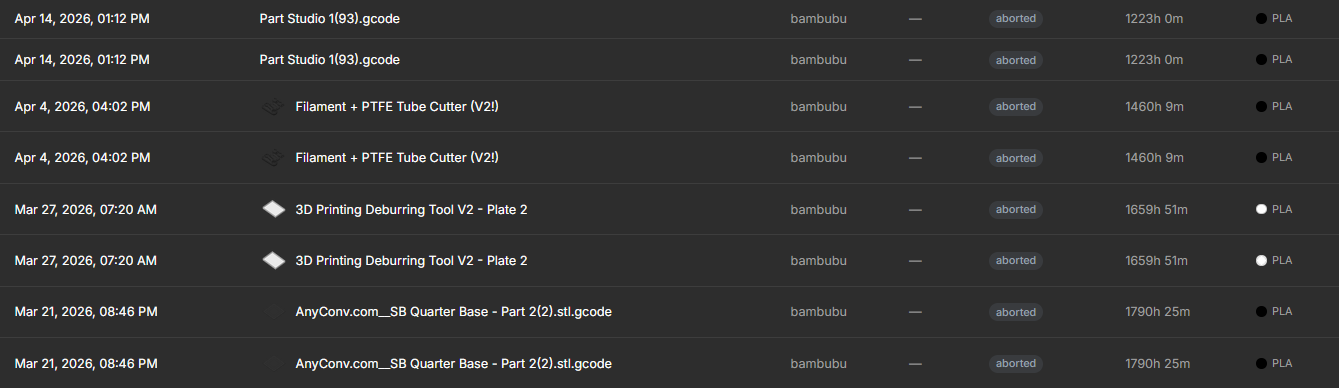
Hello, I was recently looking at my statistics, when i saw i had clocked 12501.5 hour somehow (printer only has 353 hours), turns out a few .gcode files are showing absurd times up to 1790 hours for some reason. I tried to delete the archives, but they still seem to remain.
Therefore I would like to know if there is any way to fix this. Thank you!

-
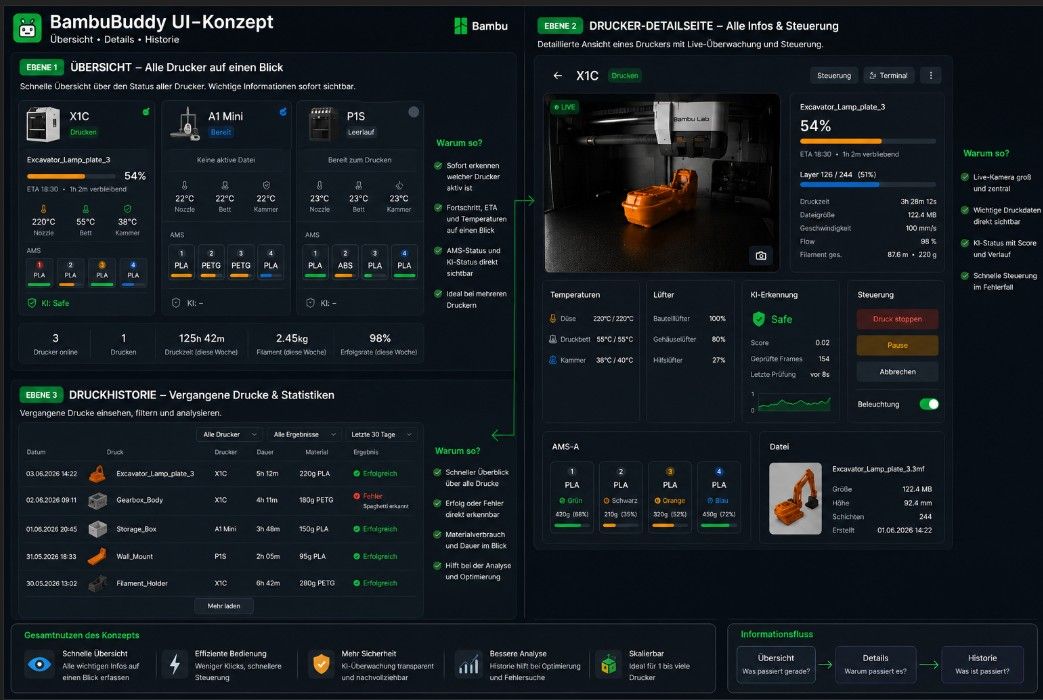
Mega Arbeit was ihr macht
 habe mir den noch mall gedanken gemacht was haltet ihr davon ?
UI-Konzept für ein modernes 3D-Drucker-Dashboard
Grundidee
Das Konzept verfolgt das Ziel, Informationen nach ihrer Wichtigkeit zu strukturieren. Der Benutzer soll nicht mit einer großen Menge an Daten überladen werden, sondern die richtigen Informationen zur richtigen Zeit erhalten.
Dafür wird die Oberfläche in drei Ebenen unterteilt:
- Übersicht
- Drucker-Details
- Historie
Ebene 1: Übersicht
Ziel
Die Übersichtsseite dient als zentrale Leitstelle für alle Drucker.
Der Nutzer soll innerhalb weniger Sekunden erkennen:
- Welche Drucker online sind
- Welche Drucker aktuell drucken
- Welcher Druck läuft
- Fortschritt und Restzeit
- Materialstatus
- Warnungen oder Fehler
Darstellung
Jeder Drucker wird als eigene Karte dargestellt.
Angezeigt werden:
- Druckername
- Druckstatus
- Aktueller Druck
- Fortschritt
- ETA
- Temperaturen
- AMS-Status
- KI-Status
Vorteil
Bei mehreren Druckern muss nicht jeder Drucker einzeln geöffnet werden.
Ein Blick genügt, um den Zustand aller Systeme zu erfassen.
Beispiel:
- X1C druckt mit 54 %
- A1 Mini ist bereit
- P1S befindet sich im Leerlauf
Ebene 2: Drucker-Detailseite
Ziel
Die Detailseite konzentriert sich vollständig auf einen einzelnen Drucker.
Hier stehen Überwachung und Steuerung im Vordergrund.
Live-Kamera
Die Kamera bildet den Mittelpunkt der Seite.
Während eines laufenden Drucks ist das Kamerabild oft wichtiger als technische Werte.
Der Nutzer erkennt sofort:
- Druck läuft normal
- Ablösung vom Druckbett
- Spaghetti
- Fehler bei der ersten Schicht
Druckinformationen
Zusätzlich werden angezeigt:
- Fortschritt
- Layerstand
- Druckzeit
- ETA
- Geschwindigkeit
- Materialverbrauch
Temperaturen
Getrennte Anzeige für:
- Düse
- Druckbett
- Kammer
Lüfter
Anzeige der aktuellen Lüftergeschwindigkeiten.
KI-Fehlererkennung
Ziel
Die KI soll nicht als Hintergrundprozess versteckt werden.
Der Nutzer soll nachvollziehen können, warum eine Warnung oder ein Druckstopp ausgelöst wurde.
Angezeigt werden:
- Aktueller Status
- Score
- Anzahl analysierter Bilder
- Zeitpunkt der letzten Analyse
Vorteil
Der Benutzer kann erkennen:
- Ist die Warnung tatsächlich kritisch?
- Handelt es sich um einen möglichen Fehlalarm?
- Wie sicher ist die aktuelle Bewertung?
AMS-Bereich
Ziel
Das AMS soll übersichtlich und visuell verständlich dargestellt werden.
Jeder Slot zeigt:
- Farbe
- Material
- Restmenge
- Status
Vorteil
Der Nutzer erkennt sofort:
- Welches Material ist eingelegt?
- Reicht das Filament für den aktuellen Druck?
- Welcher Slot wird aktuell verwendet?
ohne zusätzliche Menüs öffnen zu müssen.
Steuerung
Die wichtigsten Aktionen befinden sich direkt auf der Detailseite:
- Druck pausieren
- Druck fortsetzen
- Druck abbrechen
- Beleuchtung schalten
Vorteil
Schneller Zugriff im Fehlerfall.
Keine Navigation durch mehrere Untermenüs.
Ebene 3: Druckhistorie
Ziel
Die Historie soll mehr sein als eine einfache Liste.
Jeder Druckeintrag enthält:
- Vorschaubild
- Druckname
- Drucker
- Dauer
- Material
- Ergebnis
Beispiele
Erfolgreich:
Excavator_Lamp_plate_3
- 5 h 12 min
- 220 g PLA
- Erfolgreich
Fehlgeschlagen:
Gearbox_Body
- Spaghetti erkannt
- Nach 4 h 11 min beendet
Vorteil
Der Nutzer kann langfristig nachvollziehen:
- Welche Modelle erfolgreich waren
- Welche Drucke Probleme verursacht haben
- Wie zuverlässig die Drucker arbeiten
- Welche Materialien häufiger zu Fehlern führen
Warum dieses Konzept?
Viele bestehende Oberflächen versuchen, alle Informationen gleichzeitig darzustellen.
Dadurch entstehen:
- Überladene Dashboards
- Schlechte Übersicht
- Unnötige Klickwege
Dieses Konzept trennt Informationen nach ihrem Zweck.
Übersicht
Was passiert gerade?
Detailseite
Warum passiert es?
Historie
Was ist bereits passiert?
Dadurch bleibt die Oberfläche auch bei mehreren Druckern übersichtlich, schnell bedienbar und leicht erweiterbar.
Erwarteter Nutzen
- Schnellere Übersicht über alle Drucker
- Weniger Klicks im täglichen Betrieb
- Bessere Skalierbarkeit bei mehreren Druckern
- Höhere Transparenz bei KI-Erkennungen
- Verbesserte Nachvollziehbarkeit vergangener Drucke
- Klare Trennung zwischen Überwachung, Steuerung und Analyse
Das Ergebnis ist eine moderne, übersichtliche und zukunftssichere Benutzeroberfläche, die sowohl für einzelne Drucker als auch für größere Druckerflotten geeignet ist.
-
Hey everyone,
I'm bringing on a contributor whose specific focus is keeping an eye on Bambuddy's security going forward.
What the role looks like:
Track the dev branch and flag changes touching auth, permissions, token handling, or the CI security backstops. Async post-merge, so it doesn't gate in-flight PRs — findings get raised before the next release cut.
What I'm looking for:
- A habit of fail-closed thinking. Knowing why "except Exception: return <permissive>" is dangerous by default matters more than formal background.
- Comfortable reading FastAPI + SQLAlchemy on the backend and a small React/TypeScript surface on the frontend.
- Time commitment is whatever you can spare. No fixed schedule, no SLA.
If interested, or you know someone who'd fit, email martin@bambuddy.cool. Happy to chat about the shape before any commitment.
Martin
-
Hi all.
I have an H2C coming next week - my first dual nozzle (well.... I have an X2D as well but havent unboxed it yet - thats next week too).
I'm happily slicing away for 8 other single nozzle Bambus and life is good with Bambuddy. My MicroSD errors seeming to be greatly reduced, and Bambuddy is really reliable (my biggest problems in the past ultimately stemmed from 100MB files to P1S's being unreliable to start.
Anyhooo.... when slicing for H2C, do I have to be super specific in the slicer with the correct AMS setup, and left vs right nozzles in the slice? Or will Bambuddy let me freely assign any AMS on any side to any nozzle when I go to queue up the print?
I want to spend this weekend slicing 50 or so regular products for the H2C in Bambuddy, but not if I'm gonna discover that a physical change of AMS setup renders a sliced file useless.
-
Hello, trying to deploy this on portainer and keep getting this error even with correct UID/GID specified.
using this stack config:
services:
bambuddy:
image: ghcr.io/maziggy/bambuddy:latest
container_name: Bambuddy
healthcheck:
test: timeout 10s bash -c ':> /dev/tcp/127.0.0.1/8109' || exit 1
interval: 10s
timeout: 5s
retries: 3
start_period: 90s
user: 1000:1000
network_mode: host
volumes:
- /volume1/docker/bambuddy/data:/app/data:rw
- /volume1/docker/bambuddy/logs:/app/logs:rw
- /volume1/docker/bambuddy/virtual_printer:/app/data/virtual_printer:rw
environment:
TZ: Pacific/Honolulu
PORT: 8109
cap_add:
- NET_BIND_SERVICE
restart: on-failure:5
-
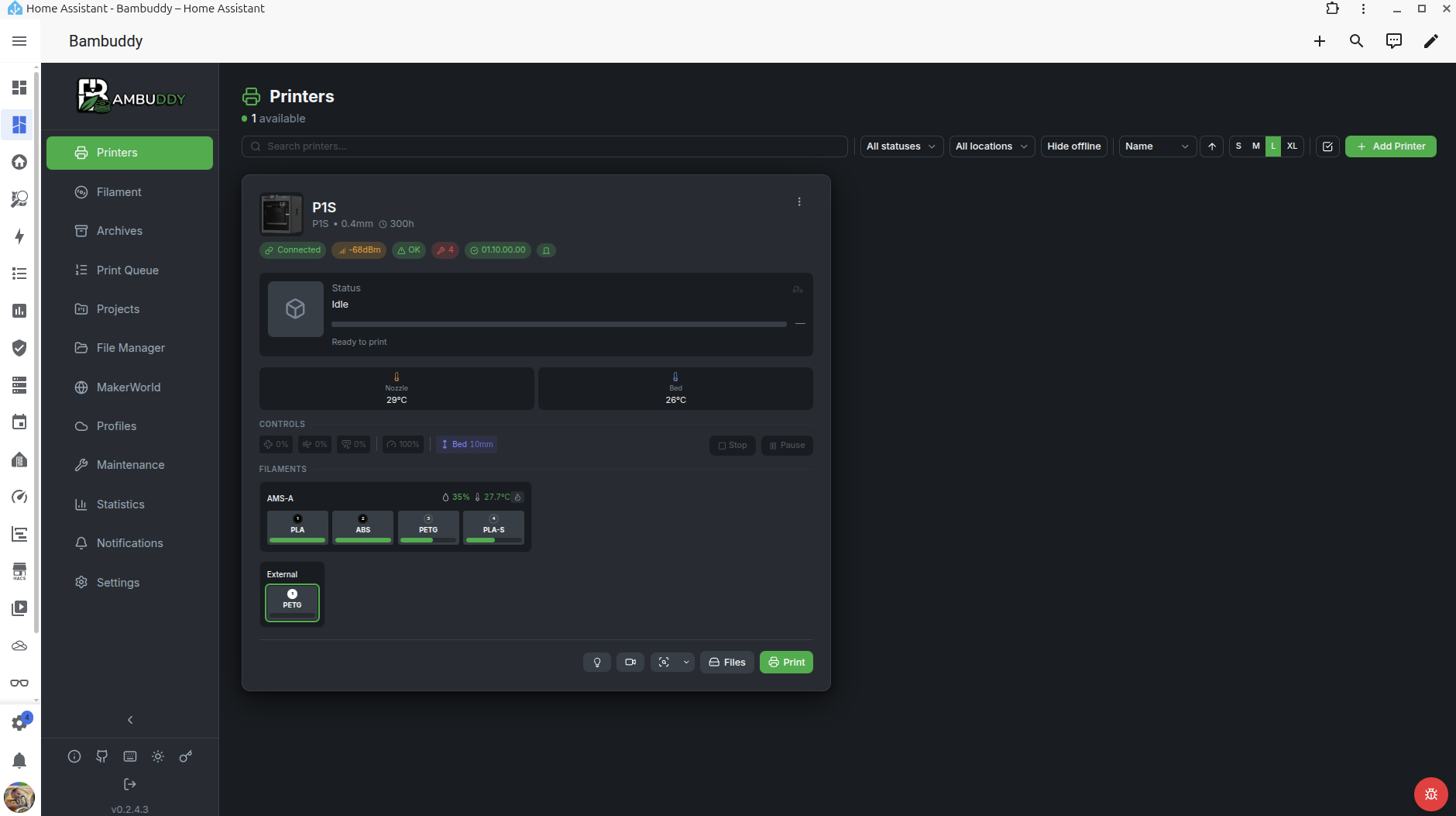
Hi, I built a native Home Assistant Supervisor add-on for BamBuddy. It wraps the official Docker image and integrates it directly into HA — with persistent storage, configurable options, and sidebar embedding support.
Repository: https://github.com/naked-head/homeassistant-addons
Happy to take feedback or contributions.